> ## Documentation Index
> Fetch the complete documentation index at: https://docs.vantagecheats.com/llms.txt
> Use this file to discover all available pages before exploring further.
# R6
> Full setup and launch guide for Rainbow Six Siege (Exodus).
Pricing, features, and status.
## 1. System prep
Make sure you've completed the [Getting Started checklist](/getting-started/before-installing) first.
Disable **everything** related to security — Windows Defender, Windows password/PIN (if you use the spoofer), and anything else that protects the system.
## 2. Discord overlay setup
R6 uses the **Discord overlay** to render the menu.
[Download and install Discord](https://discord.com/download).
Right-click Discord and **Run as administrator**. Do this every time you launch.
Open **User Settings → Game Overlay → Overview** and match this:
* **Enable in-game overlay** — **ON**
* **Enable Legacy Overlay** — **OFF**
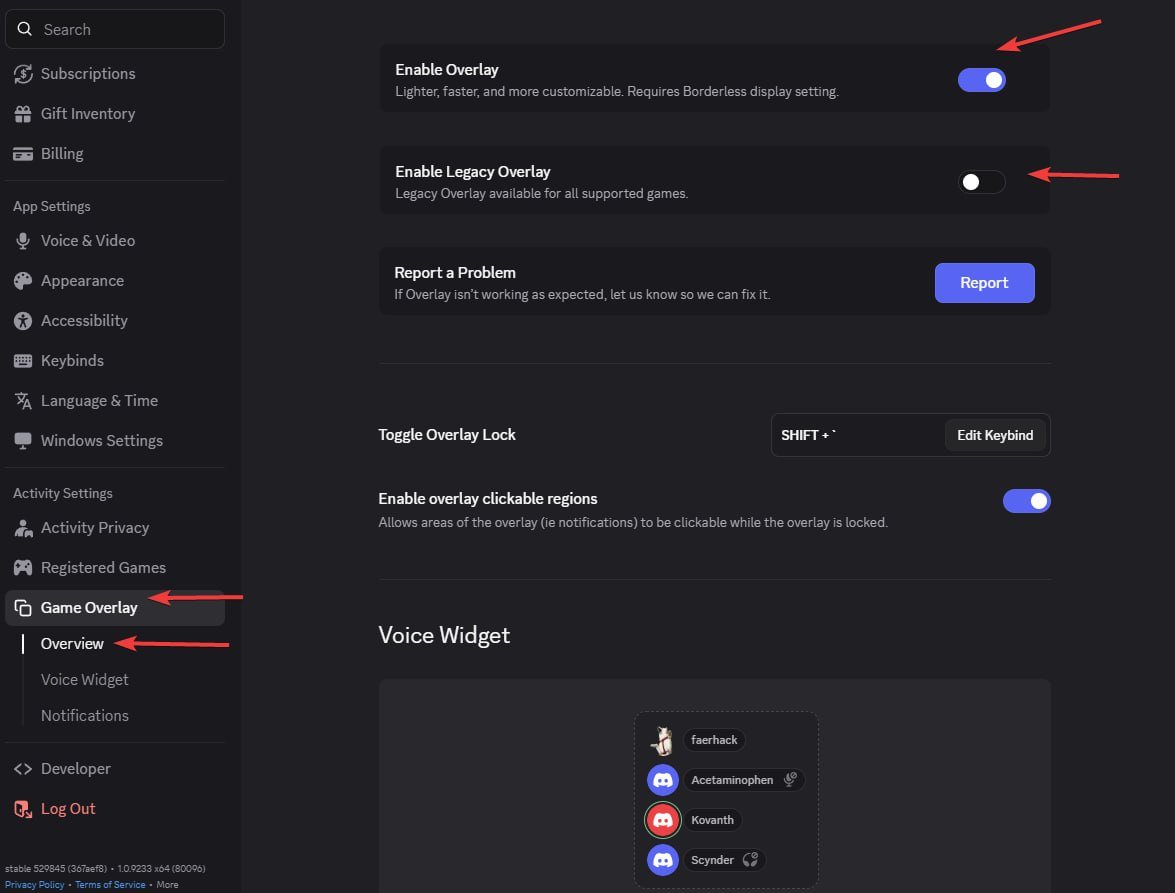 If Discord shows **No suitable overlay found**, launch R6 first, then open Discord's overlay settings while the game is running — Discord will detect it.
## 3. Launch
Exodus loader.
Discord must already be open and running as administrator before you inject.
Launch the Exodus loader.
In the loader, **right-click** to paste your key, then press **Enter**.
Choose the options you need for this session.
Launch Ubisoft Connect **before** you spoof.
Once the CMD window closes, launch R6. Wait up to 3 minutes for the menu to appear in the main menu.
Menu toggle: **Insert** key.
Stuck? [Contact Support](/support/contact).
If Discord shows **No suitable overlay found**, launch R6 first, then open Discord's overlay settings while the game is running — Discord will detect it.
## 3. Launch
Exodus loader.
Discord must already be open and running as administrator before you inject.
Launch the Exodus loader.
In the loader, **right-click** to paste your key, then press **Enter**.
Choose the options you need for this session.
Launch Ubisoft Connect **before** you spoof.
Once the CMD window closes, launch R6. Wait up to 3 minutes for the menu to appear in the main menu.
Menu toggle: **Insert** key.
Stuck? [Contact Support](/support/contact).