
Product Page
Pricing, features, and status.
1. System prep
Make sure you’ve completed the Getting Started checklist first.2. Discord overlay setup
R6 uses the Discord overlay to render the menu.1
Install Discord
2
Run Discord as administrator
Right-click Discord and Run as administrator. Do this every time you launch.
3
Enable the Game Overlay
Open User Settings → Game Overlay → Overview and match this: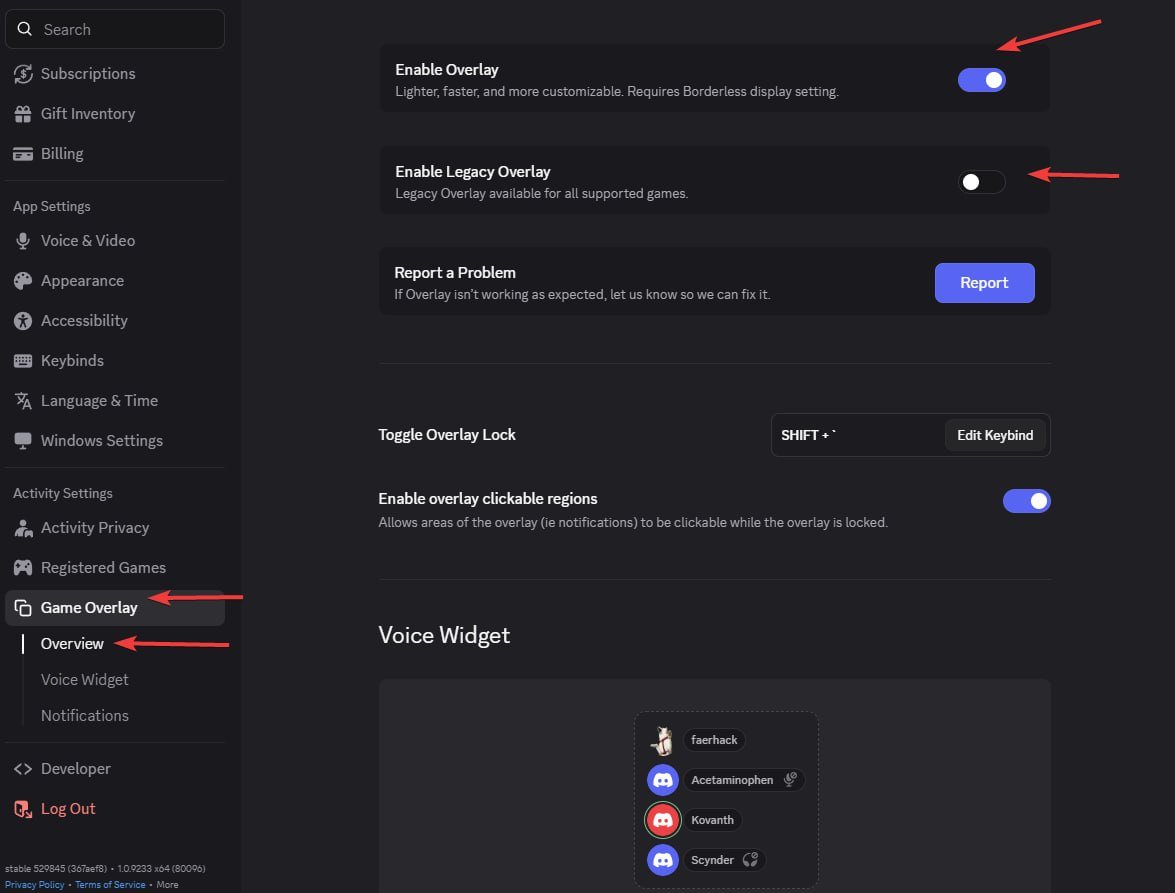
- Enable in-game overlay — ON
- Enable Legacy Overlay — OFF
4
Fix 'No suitable overlay found'
If Discord shows No suitable overlay found, launch R6 first, then open Discord’s overlay settings while the game is running — Discord will detect it.
3. Launch
Download Loader
Exodus loader.
1
Confirm Discord is running as admin
Discord must already be open and running as administrator before you inject.
2
Run the loader
Launch the Exodus loader.
3
Paste your license key
In the loader, right-click to paste your key, then press Enter.
4
Answer Cleaner / Spoofer prompts
Choose the options you need for this session.
5
Open Ubisoft Connect, then spoof
Launch Ubisoft Connect before you spoof.
6
Launch R6
Once the CMD window closes, launch R6. Wait up to 3 minutes for the menu to appear in the main menu.